

Most local businesses do not lose customers because their website looks bad. They lose them because nobody searching for what they sell ever sees the site at all.
That is the whole game for a local company. You are not competing for the entire internet. You are competing for the few hundred people in your service area who are, right now, typing something into their phone that you can answer. Optimizing a local business website means making yourself the obvious result for those specific searches in those specific towns.
This post walks through how we actually do it, in the order we do it. The running example is a lawn care company we built and optimized. It is a small operation serving a handful of suburbs, which is exactly the situation most local businesses are in.
The local SEO checklist
- Find the words your customers actually use
- Claim and fill out your Google Business Profile
- Build one real page per city you serve
- Write your own title tags and meta descriptions
- Optimize your text
- Optimize your images
- Add local structured data
- Make the pages fast
- Add internal and external links
Work top to bottom. The order matters: the first three do most of the work, and everything after them compounds on top of that foundation rather than substituting for it.
1. Find the words your customers actually use
Before you write a single line, you need to know what people type. Not what you call your service, but what they call it. A lawn care company thinks in terms of "turf maintenance programs." The customer types "grass cutting near me."
Put yourself in the shoes of somebody who needs you and does not know your industry's vocabulary. For our lawn care client serving the southwest suburbs of Chicago, the real searches look like lawn care companies in Plainfield, lawn mowing service Plainfield IL, and who cuts grass near me. Three different phrasings, same customer, same job.
Where to get real keyword data
The free keyword tools have gotten worse over the years. Ubersuggest, which we used to recommend to everyone, now caps free searches to the point where it is more of a demo than a tool. Here is the order we use now:
| Source | What it gives you | Cost |
|---|---|---|
| Google Search Console | The actual queries people used to find you, with impressions and clicks | Free |
| Google autocomplete and "People also ask" | Real phrasing, real follow-up questions | Free |
| Google Keyword Planner | Volume ranges by location | Free with an Ads account |
| A paid tool (Ahrefs, Semrush, Ubersuggest Pro) | Competitor keywords, precise volume | Paid |
Search Console is the one that matters. It is free, it is your own data, and it tells you which searches you are already showing up for on page two. Those are the pages worth fixing first, because you are one good edit away from page one. If your site is not verified in Search Console, stop reading and go do that.
Write the list down. You will use it in every step that follows.
2. Claim and fill out your Google Business Profile
If you do only one thing on this list, do this one. Your Google Business Profile is the highest-return asset a local business has, and it is free.
When somebody searches for a local service, Google shows a map with three businesses on it before it shows a single normal search result. That map pack is not fed by your website. It is fed by your Google Business Profile. You can have the best-optimized site in your county and still lose every customer to the three businesses sitting above you in that box.
So: claim the profile, verify it, and then actually fill it in. Categories, service areas, hours, phone number, services with descriptions, and photos. Real photos of real work, added regularly, not stock images.
Then get reviews and reply to all of them. Reviews are the part business owners avoid, and they are the part that moves the needle hardest.
Your name, address and phone number must be identical everywhere. "Suite 200" on your website and "Ste. 200" in your profile is the kind of mismatch that quietly holds a local business back. Pick one exact format and use it on your site, your profile, and every directory you appear in.
Do the same on Bing through Bing Places, and on Apple Maps through Apple Business Connect. Both take about twenty minutes. Apple matters more than it used to, because it is what answers when somebody asks Siri for a plumber.
3. Build one real page per city you serve
Here is the strategy that does the heavy lifting on the website itself: one page for every city in your service area.
The reason is simple. Somebody in Plainfield searching for lawn care is not going to be impressed by a page that says "we serve the southwest suburbs." Google is not either. A page titled "Plainfield Lawn Care" that talks about Plainfield, shows work done in Plainfield, and lists the Plainfield neighborhoods you cover will beat a generic services page every time, for that one search.
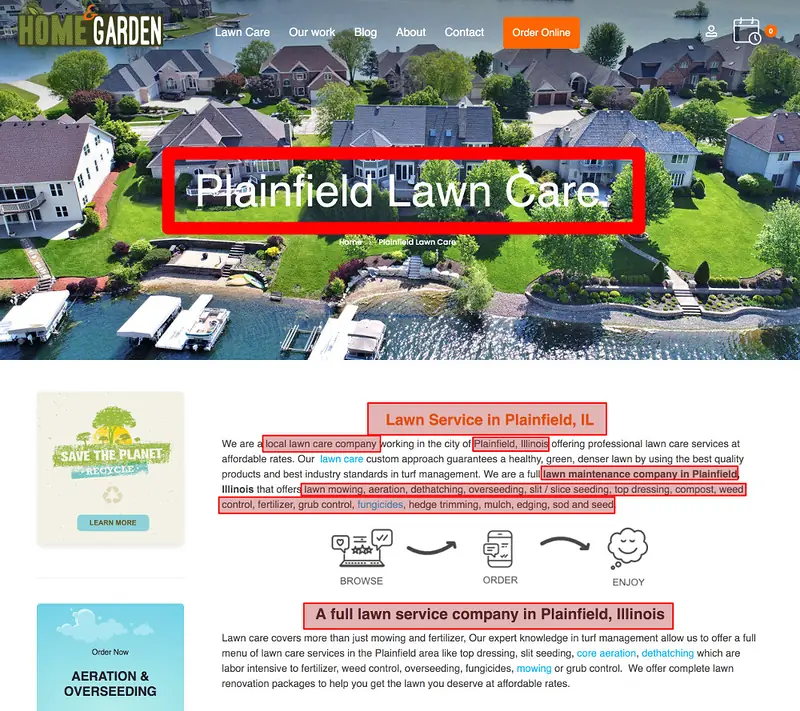
Do this for every town you actually service. For our lawn care client that meant a page for each suburb they cover, and it put them on the first page in several of those towns.
The trap is obvious and everybody falls into it: you build the first page, then copy it eleven times and swap the city name. That is a thin doorway page, and it is the one local SEO tactic Google has been explicitly penalizing for years. The difference between a city page that works and one that gets ignored:
| A real city page has | A thin copy has |
|---|---|
| Photos of jobs you did in that town | The same stock photo as every other page |
| Neighborhoods, landmarks, local specifics | The city name pasted into a template |
| Reviews from customers in that city | The same three reviews sitewide |
| Details that only apply there: pricing, travel, local conditions | Identical body copy |
| Its own title tag, meta description and schema | A duplicated title with one word changed |
If you cannot write two genuinely different paragraphs about working in that town, you probably should not have a page for it yet.
4. Write your own title tags and meta descriptions
The title tag and meta description are the two lines of HTML that decide whether somebody clicks your result or the one below it.
Title tag and meta description example
<!-- Title tag -->
<title>Plainfield Lawn Care | Mowing & Fertilizing | Home & Garden</title>

<!-- Meta description -->
<meta name="description" content="Weekly lawn mowing, aeration and fertilizing in Plainfield, IL. Family-run, fully insured, free estimates. Serving Plainfield and the nearby suburbs.">
Keep the title around 50 to 60 characters and the description around 150 to 160. Put the important words first, name the city, and make it read like a sentence a human wrote.
Google will sometimes rewrite what you wrote. It has done this for years now, swapping in text from your page when it thinks it fits the search better. That is not a reason to skip the step. A well-written title is used as-is most of the time, and when Google does rewrite it, it pulls from the page you optimized anyway.
If you are on WordPress, one SEO plugin handles this. Yoast, Rank Math, whichever. Install one. Two SEO plugins fighting over the same meta tags is a real problem we have had to untangle more than once.
5. Optimize your text
The old advice was to write at least 500 words, and a thousand if you can. Ignore word counts. They were always a proxy for the thing that actually matters, which is whether the page finishes the job the visitor came to do.
Somebody landing on your Plainfield lawn care page wants to know: do you come to my street, what does it cost, how often do you come, are you insured, and how do I book you. A page that answers all five in 400 words beats a 1,500-word page that buries them under history and mission statements.
Use your headings properly while you are at it. One <h1> for the page title, <h2> and <h3> for the sections underneath it, in order. Use your keywords where they fit naturally and nowhere else, because keyword stuffing reads badly to customers and has not worked on Google in a decade.
This matters more now than it did, because search results increasingly include an AI-generated summary above the links. Those summaries get built from pages that give a straight answer. Vague marketing copy gives them nothing to quote.
6. Optimize your images
Image optimization is getting file sizes down without making the photos look worse, and naming things so they can be found. Rename the file before you upload it. plainfield-lawn-mowing.jpg tells Google something. IMG_4471.jpg tells it nothing.
Write real alt text describing what is in the photo, use modern formats, and never upload a 4000-pixel-wide camera file to be displayed at 800 pixels. We covered the whole process, formats and compression included, in how to optimize images for SEO.
7. Add local structured data
Structured data is code you add to a page that tells search engines what the page is about in a format they do not have to guess at. For a local business it is the difference between Google inferring you might be in Illinois and Google knowing your address, hours, phone number and service area.
The format to use is JSON-LD. It sits in a script tag and does not change anything a visitor sees. Drop this before the closing </body> tag and replace the details with your own:
<script type="application/ld+json">
{
  "@context": "https://schema.org",
  "@type": "LocalBusiness",
  "name": "Home & Garden Lawn Care",
  "url": "https://example.com/plainfield-lawn-care/",
  "telephone": "+1-815-555-0142",
  "priceRange": "$$",
  "image": "https://example.com/images/plainfield-lawn-mowing.jpg",
  "address": {
    "@type": "PostalAddress",
    "streetAddress": "1420 Route 59",
    "addressLocality": "Plainfield",
    "addressRegion": "IL",
    "postalCode": "60544",
    "addressCountry": "US"
  },
  "geo": {
    "@type": "GeoCoordinates",
    "latitude": 41.6320,
    "longitude": -88.2067
  },
  "areaServed": [
    { "@type": "City", "name": "Plainfield" },
    { "@type": "City", "name": "Joliet" },
    { "@type": "City", "name": "Naperville" }
  ],
  "openingHoursSpecification": [{
    "@type": "OpeningHoursSpecification",
    "dayOfWeek": ["Monday","Tuesday","Wednesday","Thursday","Friday"],
    "opens": "07:00",
    "closes": "18:00"
  }]
}
</script>
Use the most specific @type that fits you. LocalBusiness works for anything, but schema.org has more precise types like Plumber, Dentist, Electrician and GeneralContractor, and specific is better. To get your coordinates, right-click your location in Google Maps and the latitude and longitude are at the top of the menu.
Do not mark up your own reviews of yourself. Review stars sound tempting, but Google stopped showing rich review snippets for businesses reviewing themselves years ago. Reviews on your Google Business Profile are what show up. We go deeper on this in a separate post.
Test everything you add with Google's Rich Results Test before you move on. We wrote up the full structured data process in improve search engine rankings with structured data.
8. Make the pages fast
Speed is a ranking factor, but the bigger reason to care is that people leave. Somebody standing in their driveway on a phone with two bars will not wait eight seconds to find your phone number.
Google measures three things, called Core Web Vitals: how fast the main content appears, how quickly the page responds when someone taps something, and whether the layout jumps around while loading. You can check any page of your site free with PageSpeed Insights.
In practice, on the small business sites we work on, slow almost always comes down to the same three things: oversized images, a pile of plugins each loading its own scripts, and a bloated theme. Static versus WordPress gets into when the platform itself is the problem.
9. Add internal and external links
Internal links, meaning links from one page of your site to another, tell search engines which of your pages matter and how they relate. They also keep visitors moving.
- Link every city page to the service pages it mentions, and back again
- Keep your most important pages in the main navigation
- Link to relevant blog posts from your service pages
- Put the less important links in the footer
- Use descriptive link text: "Plainfield lawn care," not "click here"
Externally, what counts for a local business is being listed consistently in the places that matter, and being linked to from your own community:
- Google Business Profile, Bing Places, and Apple Business Connect
- Your social profiles, linked both ways
- The industry directories customers in your trade actually use, whether that is Angi, Yelp, Houzz or Thumbtack
- Your local chamber of commerce, suppliers, trade associations, and the youth team you sponsor
That last group is worth more than it sounds. A link from the local little league is not impressive on paper, but it is exactly the kind of local signal a national competitor cannot buy. More on how this compounds in how to increase domain authority.
Bottom Line
Local SEO is not a trick. It is filling out your Google Business Profile properly, building a real page for every town you serve, and making each of those pages answer the whole question fast.
Do the first three items on the checklist and you will be ahead of most of your competitors, because most of them never got past building the site. Do all nine and you own the map for your service area.
Verify your site in Google Search Console, claim your Google Business Profile, and pick the one city you most want to win. Build that page properly, then repeat it for the next town.