

You serve twelve towns. Your website mentions one, the one your office sits in, and maybe a line somewhere that says "and surrounding areas."
That line is costing you eleven towns' worth of customers. Somebody in the next town over searches for what you do, sees three local competitors, and never learns you would have driven fifteen minutes to help them. Google cannot rank you for a place your website never talks about.
A city page fixes that. It is a page built for one town, and it is the single highest-leverage thing a service business can add to its site. This is how we build them.
What a city page actually is
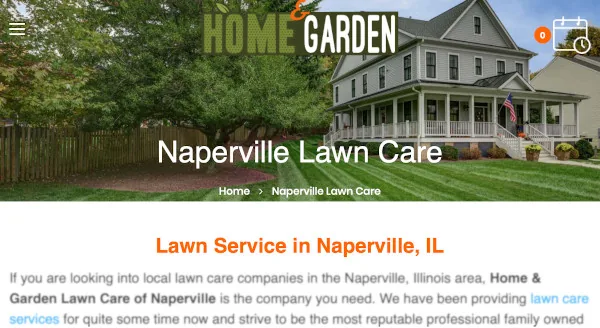
A city page is a page on your site targeting one geographic area: a town, a suburb, a county, sometimes a zip code. Not a directory listing, not a paragraph buried in your services page. A real page with its own URL, its own title tag, and content written about that place.
The reason it works is the way people search. They almost never type just the service. They type the service plus where they are:
| What they type | What Google needs from you |
|---|---|
| "lawn care Joliet" | A page that is about Joliet |
| "plumber near me" | A Business Profile with the right service area |
| "electrician in New Lenox" | A page that is about New Lenox |
One generic services page cannot be the best answer to all three. Three pages can.
City pages win you the organic results. The map pack above them is fed by your Google Business Profile, which is a separate thing you also need. We covered the whole picture in how to optimize a local business website. This post is the deep dive on the page side.
Do city pages still work?
Yes, and the reason has not changed in fifteen years: Google is trying to return the most relevant local result, and relevance to a place is mostly demonstrated by talking about that place.
What has changed is the competition for screen space. A local search now typically shows an AI-generated summary, then a map with three businesses, then the organic results. Your city page is competing for that third block, and increasingly feeding the first one, because those summaries are assembled from pages that answer the question directly.
That makes specificity more valuable than it used to be, not less. A page that names neighbourhoods, lists what you actually do there, and gives a real price range has something to be quoted. A page that says "we proudly serve the greater area with quality service" has nothing.
The line between a city page and a doorway page
This is the part that gets businesses in trouble, so be clear about where the line sits.
Google has a published policy on doorway pages: groups of pages created to rank for similar queries, that funnel users to the same destination without being useful in their own right. Building one page per town is not a doorway. Building forty near-identical pages with the town name swapped in is, and it is one of the few local tactics Google names explicitly.
Take your Joliet page and your New Lenox page, put them side by side, and hide the town names. If you cannot tell which is which, you have built doorway pages. Not two useful pages, one useful page duplicated, which is worse than having neither because it drags on the rest of the site.
Older advice blamed this on the Panda update. That is out of date. Panda launched in 2011 and was folded into Google's core ranking years ago. There is no separate penalty to dodge now. Thin, duplicated pages simply do not rank, and enough of them makes the whole site look low quality.
What goes on a real city page
Every page needs the same skeleton. The parts that make it real are the ones that could only have been written about that town.
| Ingredient | Why it earns its place |
|---|---|
| Photos of work you did there | The one thing a competitor cannot copy. Stock photos signal the opposite. |
| Neighbourhoods and landmarks | Matches how people describe where they live, and proves you know the place. |
| Reviews from customers in that town | Local proof, and it is unique text by definition. |
| What is different about working there | Clay soil, older homes, HOA rules, parking, travel time. This is where real knowledge shows. |
| Services and pricing for that area | Often genuinely different by distance, and answers the question they came with. |
| Its own title tag, description and schema | Otherwise the pages compete with each other instead of with your competitors. |
If you cannot fill in the fourth row for a town, you probably do not know it well enough to have a page for it yet.
Build pages only for places you actually serve
The temptation is to spin up a page for every town within a hundred miles. Resist it.
Pages for places you have never worked are the easiest kind to spot, because there is nothing real to put on them. They dilute the pages that are genuine, and they bring you enquiries you have to turn down, which wastes your time and annoys the customer.
Build for the towns you would actually drive to tomorrow. For most service businesses that is somewhere between five and fifteen. Get those right and then expand if the work justifies it.
Link them properly
A city page nobody links to is an orphan page, and orphan pages get crawled late and rank badly. Three things to do:
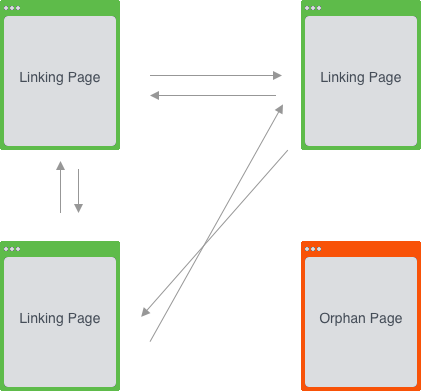
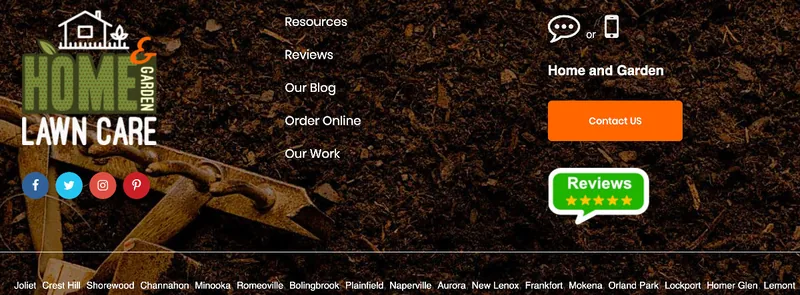
- Put them in the footer under a heading like "Areas We Serve", so every page on the site links to every city page.
- Link each city page to the service pages it mentions, and link those services back to the towns they are available in.
- Link from relevant posts. If you write about a job you did in Mokena, link it to the Mokena page.
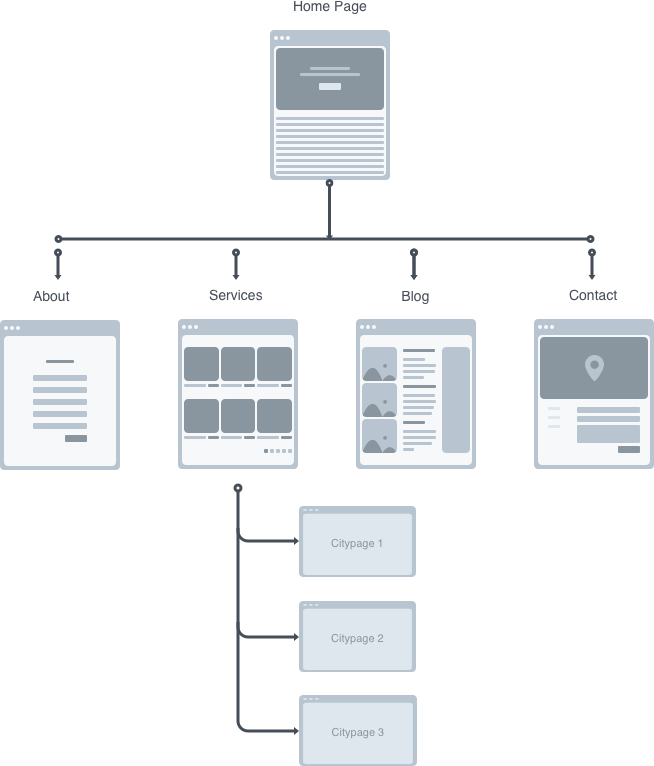
Use the town name in the link text. "Mokena lawn care" tells Google what the page is about. "Click here" tells it nothing. More on how internal linking compounds in how to increase domain authority.
Get local links pointing at them
Links from other sites still matter, and for city pages the useful ones are local rather than impressive:
- The chamber of commerce in that town
- Suppliers and trade partners who list who they work with
- The youth team, school fair or community event you sponsor
- Local business directories that real people in that town use
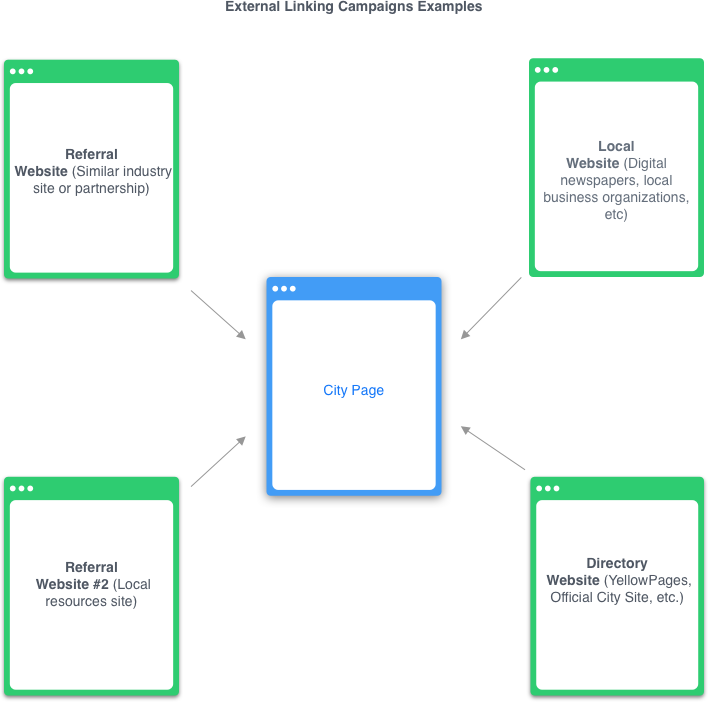
Point them at the relevant city page, not your homepage. A link from the Joliet chamber to your Joliet page is worth more than the same link to your front door, because it reinforces the exact thing that page is trying to prove.
Add structured data to every city page
Structured data tells search engines what the page is about without making them infer it. On a city page the part that matters is areaServed: it states, in a format Google does not have to guess at, which town this page is for.
Keep it small. The useful properties are the ones a customer would ask about:
<script type="application/ld+json">
{
  "@context": "https://schema.org",
  "@type": "LocalBusiness",
  "name": "Example Lawn Care",
  "url": "https://example.com/joliet-lawn-care/",
  "telephone": "+1-815-555-0142",
  "priceRange": "$$",
  "image": "https://example.com/images/joliet-lawn-mowing.jpg",
  "address": {
    "@type": "PostalAddress",
    "streetAddress": "1420 Route 59",
    "addressLocality": "Joliet",
    "addressRegion": "IL",
    "postalCode": "60435",
    "addressCountry": "US"
  },
  "areaServed": {
    "@type": "City",
    "name": "Joliet"
  }
}
</script>
One block per city page, with the town changed in areaServed and the address. Resist the urge to paste a hundred lines of service catalogue into it; a long block is not a better block, and everything in it should be something you would say to a customer.
Test each page with Google's Rich Results Test before moving on. The full process is in improve search engine rankings with structured data.
Putting a Joliet address on a page when you have no premises in Joliet is not an SEO tactic, it is a fake listing, and it is the fastest way to lose a Business Profile. If you serve a town without being based there, say so and use areaServed without a local address.
Finish the on-page work
A city page is still a page, so the ordinary rules apply. Write your own title tag and description with the town in them, use headings in order, and name and compress your images properly, which matters more here because city pages are photo heavy. We covered image work in how to optimize images for SEO.
Bottom Line
City pages work because they answer the question people actually type, which is almost never just the service but the service plus a place.
Build one page for each town you genuinely serve. Put something on each one that could only have been written about that town. Link them from your footer and from each other, get a few local links pointing at them, and give each one its own structured data.
Do that for five towns and you will feel it. Do it for twelve and you own your service area.
Pick the one town you most want work from and build that page properly, start to finish. It is the template for every page after it, and it tells you honestly how much you have to say about a place before you commit to eleven more.